Skip to content
Stan Consulting

Shopify tools | Updated July 28, 2026

Best Shopify tools for small stores

Start with the store problem, not the app. This page shows five useful tools, what each costs, where to find the important screen, and when not to install it.

Start here

Start here

Name the job before you install an app.

Every app adds another screen, another bill, and another place something can break. Pick one job. Install one tool. Check whether it changed a useful number before adding another.

Step 1

Find the leak

Choose one: visitors do not buy, buyers do not return, products have weak proof, repeat products lack subscriptions, or shoppers need answers.

Step 2

Use the smallest tool

Start with the free plan when it covers the job. A larger plan is useful only after the free limit blocks real work.

Step 3

Check the store after setup

Test the product page, cart, mobile view, emails, chat, and tracking as a customer. Do this again after a theme change.

Five useful tools

What each tool does and where to look.

A small Shopify store does not need all five. Microsoft Clarity is the first choice when you do not know what is wrong. Judge.me helps when proof is weak. Klaviyo helps when the store is ready to maintain email flows.

Email and SMS

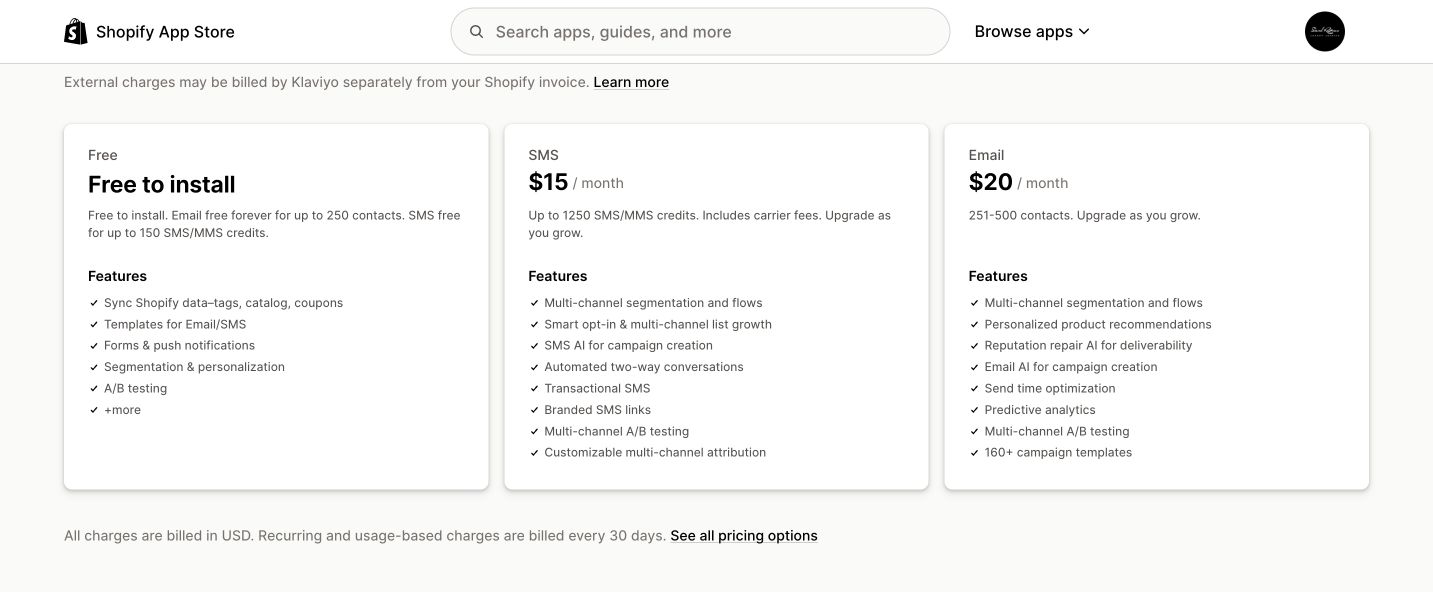
Klaviyo

Klaviyo sends welcome, abandoned-cart, post-purchase, replenishment, and win-back messages using Shopify customer and order data.

Price
Free to 250 email contacts. The first email tier shown is $20 per month for 251–500 contacts. SMS starts free and the first paid tier shown is $15 per month for 1,250 credits.
Good for
A store that is ready to build and maintain more than a newsletter.
Where to look
In Klaviyo, open Flows for automations and Analytics > Metrics to confirm Shopify activity is syncing.
Limits
Price rises with contacts and message volume. A theme change can disable tracking. Do not run overlapping Shopify and Klaviyo abandoned-cart emails.
Alternatives
Shopify Email, Omnisend, or Mailchimp.

How to use it

  1. Install Klaviyo and connect the correct store-name.myshopify.com store.
  2. Choose the list that receives Shopify email subscribers.
  3. In Shopify, open Online Store > Themes > Customize > App embeds and enable Klaviyo.
  4. Start with a welcome flow and an abandoned-cart flow.
  5. Before going live, exclude people who ordered and turn off any overlapping Shopify email.

Official product and pricing page

Klaviyo Shopify App Store page showing current pricing
Official product page, captured July 28, 2026. Check the linked source before buying because prices can change.

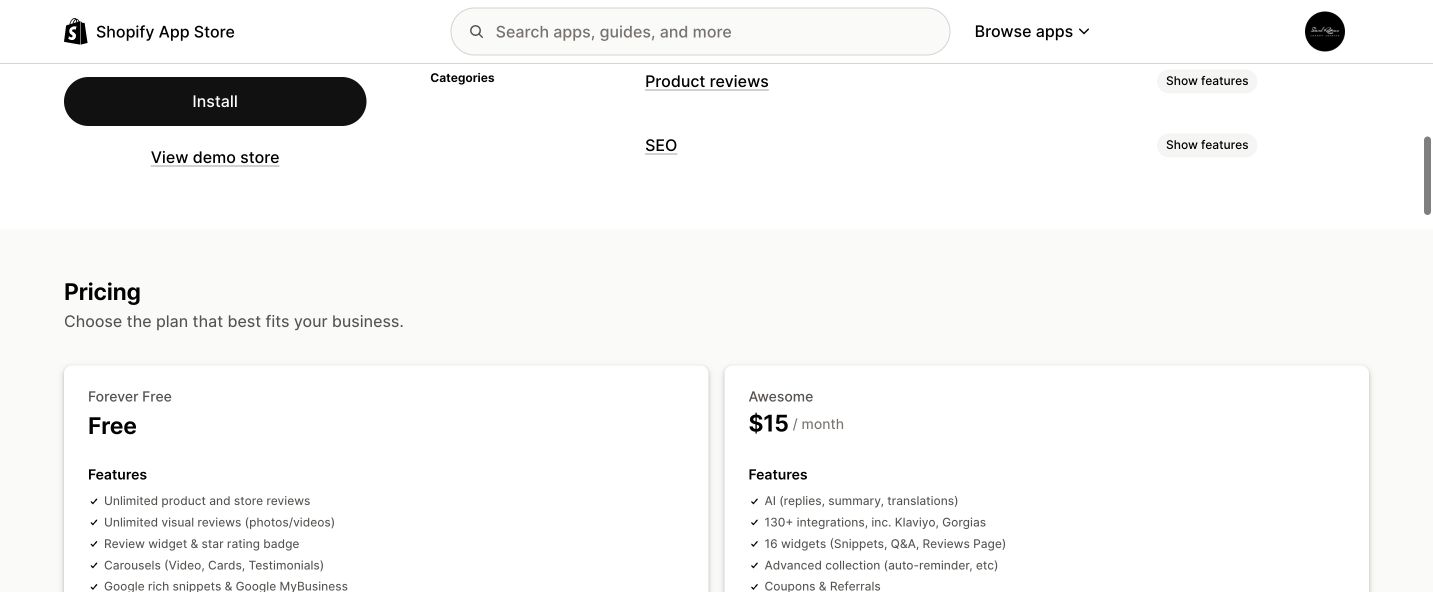
Product reviews

Judge.me

Judge.me collects product and store reviews, displays star ratings, and sends review requests after an order event.

Price
The Forever Free plan includes unlimited reviews and photo or video reviews. The Awesome plan is $15 per month with a 15-day trial.
Good for
Stores that need visible buyer proof on product and collection pages.
Where to look
In Judge.me, use Settings > Request scheduling for timing and Reviews > Review requests to see what was sent.
Limits
Advanced design, coupons, Google Shopping, and major integrations need the paid plan. Duplicate widgets can appear if the app embed and manual blocks are both added badly.
Alternatives
Yotpo Product Reviews, Fera, or Loox.

How to use it

  1. Install Judge.me and finish its onboarding.
  2. Enable the Judge.me app embed in the Shopify theme editor.
  3. Add the Review Widget to the default product template.
  4. Put the star-rating block near the product title or price.
  5. Choose Fulfilled or Delivered as the request trigger, then test one request.

Official product and pricing page

Judge.me Shopify App Store page showing the free and paid plans
Official product page, captured July 28, 2026. Check the linked source before buying because prices can change.

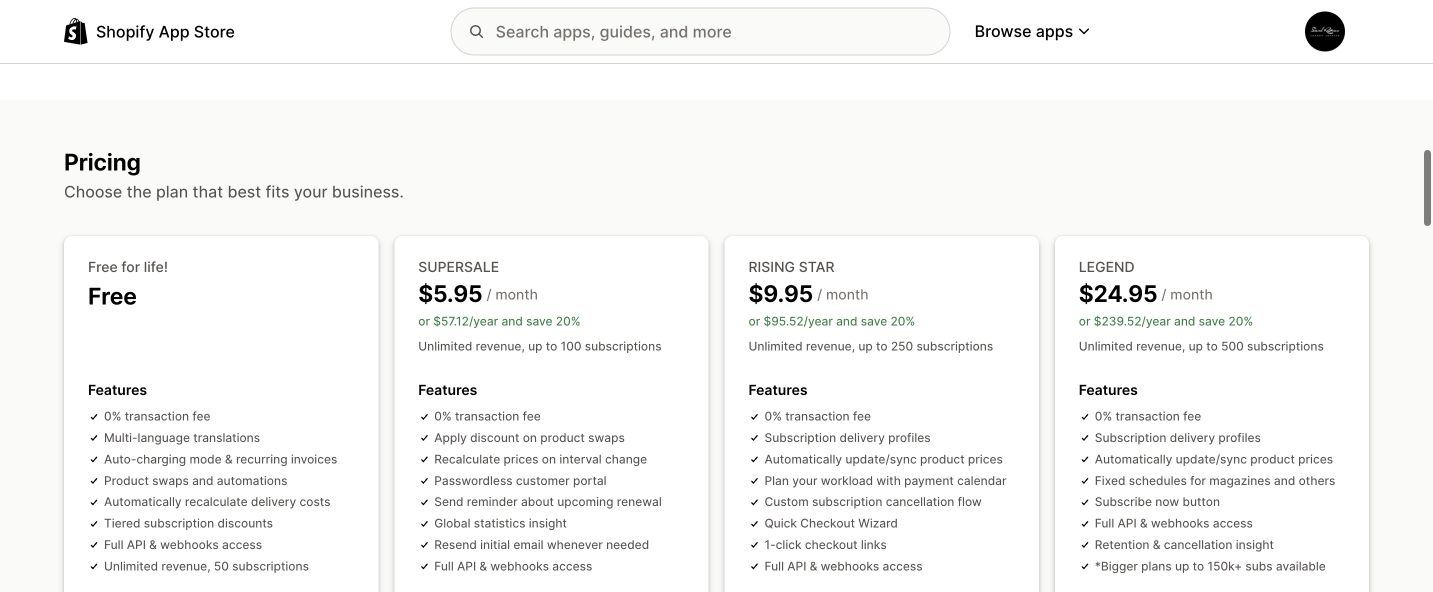
Recurring orders

Seal Subscriptions

Seal adds recurring purchases for replenishment products, memberships, and subscription boxes without adding a percentage transaction fee.

Price
Free to 50 subscriptions. Paid plans shown are $5.95 for 100, $9.95 for 250, and $24.95 per month for 500 subscriptions.
Good for
Products customers naturally need again, such as coffee, supplements, pet products, skin care, or household supplies.
Where to look
Open Apps > Seal Subscriptions > Subscription rules. After setup, check the subscription list and customer portal.
Limits
A supported subscription payment gateway is required. Subscription products do not work in draft orders. Every renewal, discount, shipping, and cancellation path needs testing.
Alternatives
Shopify Subscriptions, Appstle, or Subi.

How to use it

  1. Create an auto-charging subscription rule.
  2. Choose the products, billing interval, and delivery interval.
  3. Decide whether one-time purchase remains available.
  4. Save the rule and check the product page price and choices.
  5. Run a test purchase and test the customer cancellation path.

Official product and pricing page

Seal Subscriptions Shopify App Store page showing current plans
Official product page, captured July 28, 2026. Check the linked source before buying because prices can change.

Behavior checks

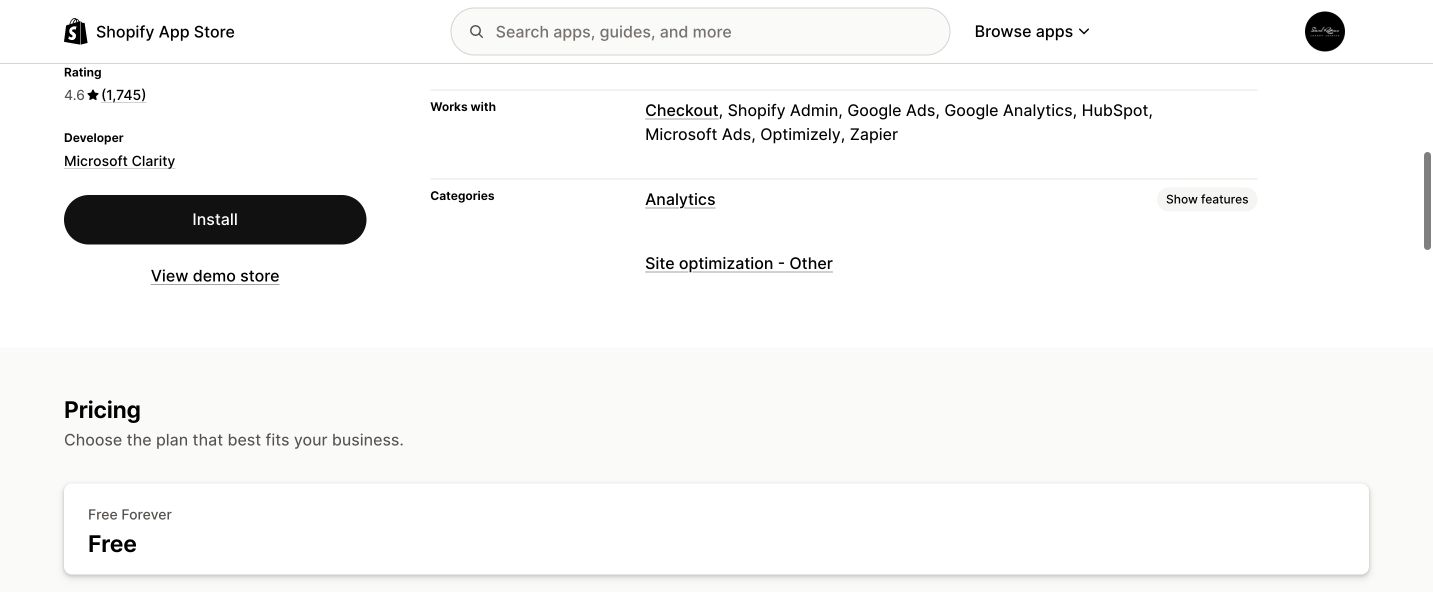
Microsoft Clarity

Clarity records anonymized visits and creates heatmaps, funnels, and behavior filters so you can see where shoppers click, stop, or get confused.

Price
Free forever. The Shopify listing shows no paid tier.
Good for
Finding why paid or organic visitors do not move from page to cart or order.
Where to look
Use Recordings for individual visits and Heatmaps for clicks and scroll depth. Filter by mobile, source, and entry page.
Limits
It diagnoses behavior but does not run an A/B test. Recordings are kept for 30 days. Checkout and post-checkout pixel coverage is limited to Shopify Plus.
Alternatives
Shopify Analytics, Google Analytics 4, Lucky Orange, or MIDA.

How to use it

  1. Install Microsoft Clarity from the Shopify App Store.
  2. Turn on Clarity JS in the theme settings and save.
  3. Wait a few hours for real visits to appear.
  4. Filter recordings by mobile and the traffic source you are paying for.
  5. Check heatmaps on the home, collection, product, cart, and lead pages.

Official product and pricing page

Microsoft Clarity Shopify App Store page showing its free price
Official product page, captured July 28, 2026. Check the linked source before buying because prices can change.

Store chat

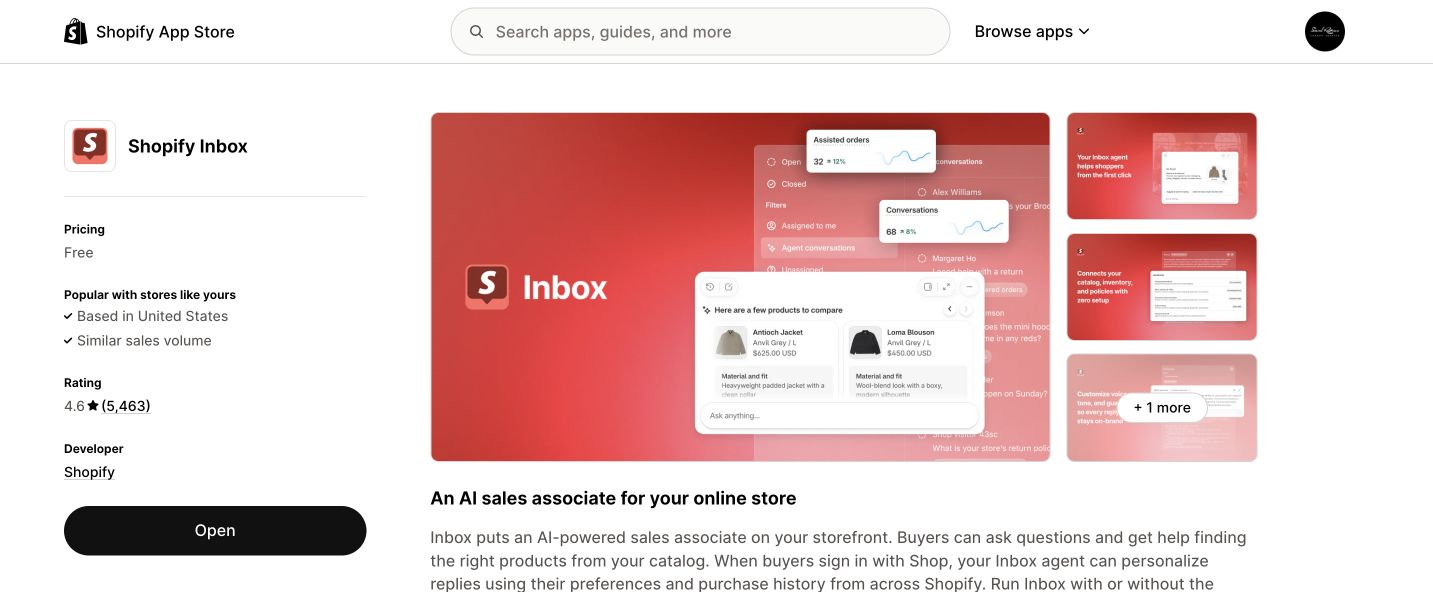
Shopify Inbox

Shopify Inbox adds storefront chat, saved answers, product links, discounts, order information, and optional AI-assisted replies.

Price
Free on Basic, Grow, Advanced, and Shopify Plus.
Good for
Stores where shoppers ask sizing, compatibility, delivery, product, or order questions before buying.
Where to look
Open Sales channels > Inbox > Chat settings. Set realistic availability and review Instant answers.
Limits
Someone still needs to monitor it. Recent App Store reviews report more visitor sign-in or detail friction and unreliable AI answers, so test the current mobile shopper experience.
Alternatives
Crisp or Tidio.

How to use it

  1. Install Shopify Inbox and enable its theme app embed.
  2. Set the chat appearance and greeting.
  3. Publish hours that match when someone can really reply.
  4. Add answers for shipping, returns, sizing, and compatibility.
  5. Test the full chat as a signed-out mobile shopper before promoting it.

Official product and pricing page

Shopify Inbox official app page
Official product page, captured July 28, 2026. Check the linked source before buying because prices can change.

Quick cost check

What you can start with.

All five have a free entry point. That does not make all five free to operate. Email costs rise with contacts, subscriptions rise with active subscriptions, and every app takes time to maintain.

ToolStart costUse it whenDo not buy it when
KlaviyoFree to 250 email contacts; paid email starts at $20/moYou will maintain welcome, cart, and post-purchase flows.You only need an occasional newsletter.
Judge.meFree; Awesome is $15/moProducts have customers but weak or hidden proof.The store has no orders to request reviews from.
Seal SubscriptionsFree to 50 subscriptions; paid starts at $5.95/moThe product has a natural repeat schedule.The product is normally bought once.
Microsoft ClarityFreeYou have traffic but do not know where shoppers get stuck.You expect the tool to fix the page automatically.
Shopify InboxFreeQuestions are stopping otherwise-ready buyers.Nobody can monitor and answer the inbox.
Install in problem order: Clarity for behavior, Judge.me for proof, Klaviyo for maintained email flows, Seal for natural repeat purchases, and Inbox only when someone can answer.

Keep it current

Where to look when a tool or rule changes.

Prices, screens, ad rules, and AI search behavior change. We keep short dated updates in Pulse and real observations in Notes. Use this guide for the setup. Use those pages for what changed.

After a theme replacement, recheck every app embed and run one real mobile test.

Next guide

Keep going only if you need it.

See all services