The media picker can now carry approved social content
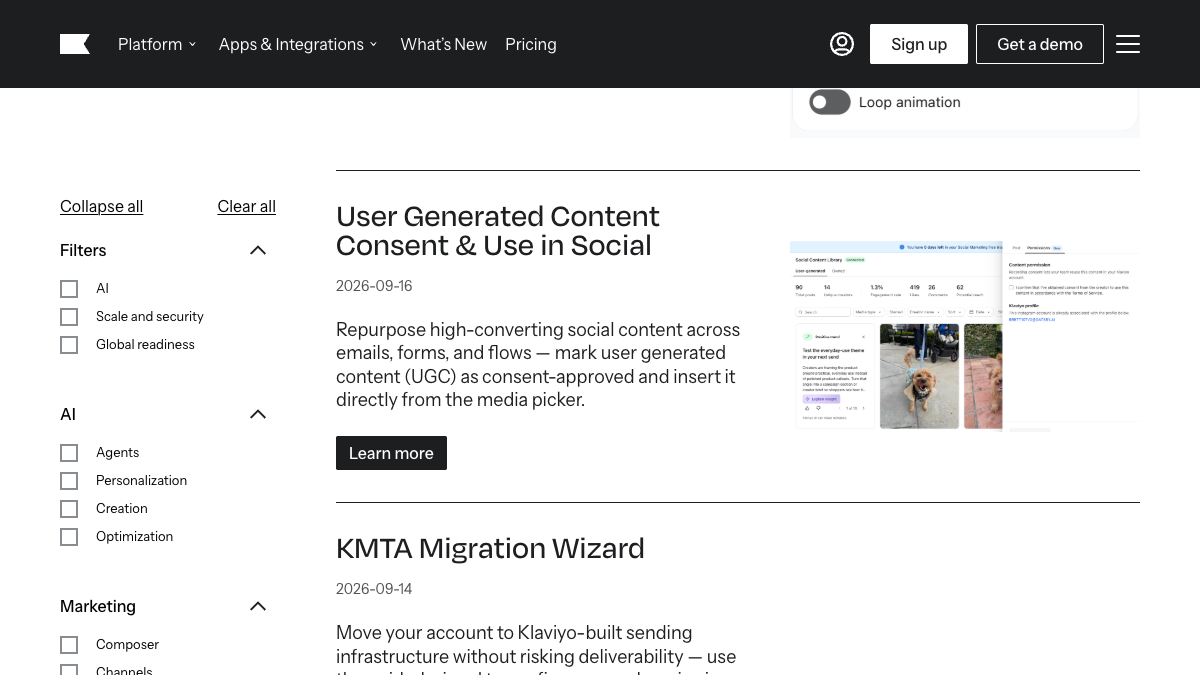
Klaviyo added a consent-approved status for user-generated content on September 16. Marketers can then insert that content into emails, forms, and flows from the media picker.
The update reduces the manual step of downloading a social post and uploading it into another campaign. It also puts the permission status beside the asset used by the team.
The status is only as good as the permission record
Marking an item consent-approved does not create the consent. Keep the creator, date, original post, request, response, allowed channels, editing terms, and expiration in a record the team can inspect.
If the permission covers one email but not paid ads or a permanent website placement, the internal status and campaign brief should say that plainly.
Reuse still needs a channel check
A social image may crop badly in email or lose the caption that gave it context. Test the asset at the real mobile width and verify its link, alt text, product reference, and current offer.
Our recommendation: make the permission record part of campaign approval. If the source or scope cannot be found, do not publish the asset.
For your next work session
What to check next
- Define the evidence required before an asset is marked approved.
- Record the creator, source URL, date, scope, edits, and expiration.
- Keep channel limits with the asset and campaign brief.
- Test crop, alt text, links, product details, and offer on mobile.
- Remove or pause any asset whose permission record cannot be found.
Sources and scope
Klaviyo announced a consent status and reuse workflow. A label inside the platform does not obtain permission, define the allowed channels, or replace the business's rights and compliance process.
The announcement is confirmed by the source below. Practical checks in this article are Stan Consulting's recommendations.
Need help applying this to your business? Email and Klaviyo marketing.