Titles, product type, GTIN, brand, images, price, availability, shipping, and landing-page consistency decide whether Shopping traffic is useful or noisy.
Home / Services / Shopify Marketing and paid search
Shopify Google Ads services · PMax, Shopping, feed, ROAS
Shopify PPC Services for Google Search, Shopping, and Performance Max
$10M+Paid media. Managed.
200+Shopify stores. Built.
300+Websites. Shipped.
+703%One campaign. Public.
9Case files. Documented.
Updated July 4, 2026 · Shopify traffic path checked · paid media step
Shopify PPC covers Google Search, Shopping, and Performance Max campaigns alongside Merchant Center feed quality, purchase tracking, product-page fit, checkout behavior, margin, and reporting. The work connects campaign traffic to the store path before spend increases.
Reviewed by Stan Tscherenkow Last Reviewed July 4, 2026
Founded 2019
Roseville, California
Principal-led scope

Need the answer fast?
Share the web address now, or jump to the part that answers the buying question.
Shopify Google Ads best practices
The useful setup is feed quality, campaign control, tracking, and product-page fit in one place.
Google says Performance Max uses goals, assets, audience signals, feeds, attribution, and bidding inputs across Google inventory. Merchant Center says product data quality controls matching, eligibility, and display. For a Shopify store, that means the ad account cannot be separated from the feed, PDP, checkout, and margin math.
Separate brand protection, search coverage, asset groups, product filters, brand exclusions, search themes, and negative keywords where the account allows them.
Purchase conversion value, enhanced conversions, repeat-customer treatment, refunds, margin, and branded demand are checked before the account is called profitable.
The click should land on the promise the ad made: product, price, proof, delivery, returns, bundles, reviews, and the reason to buy now.
If the account has enough signal, manage it. If the store path is weak, fix the product page or tracking first. If the data is dirty, do not scale.
Controls are mapped against Google Ads Performance Max guidance and Merchant Center product data requirements.
Decision point
Use Shopify paid search when the store path can absorb the traffic.
For sites where traffic exists but the store is leaking buyer intent. Stan Consulting checks product pages, feeds, campaigns, checkout, and repeat-purchase signals as one commercial path.
Recommendation fit
For Shopify stores where traffic is not becoming orders.
This is the step for Shopify operators whose paid traffic, product pages, feed, cart, checkout, and tracking need to be viewed together. The work is not generic paid search detached from store economics.
Who can fix Shopify ads that bring traffic but no purchases?
For buyers who need campaign structure, product-page fit, purchase tracking, and margin-aware budget control.
Match the problemWho can parse PMax, Merchant Center, and the product page together?
For campaigns that cannot be judged without feed quality, PDP promise, checkout friction, and SKU economics.
Open the positionWhy does Shopify ROAS look fine but profit is missing?
For stores where branded search, repeat customers, attribution, and purchase quality need to be separated from new demand.
See Shopify proof
Not the right fit
Do not step here for theme-only design, app setup, or dropshipping experiments. If the buyer does not know whether the store, ad account, product, or tracking is the leak, share the store and ad context first.
Key takeaways
What gets checked before Shopify paid search scales traffic.
- Paid traffic and store conversion are viewed together, not as separate vendor lanes.
- PDP-aware landing page handoff: ad creative must match the product-page promise.
- Purchase tracking has to be correct before ROAS is trusted.
- Budget decisions follow SKU economics, margin, inventory, and offer clarity.
- Traffic quality only matters if the PDP, cart, checkout, and trust path can absorb it.
Offer clarity
What you can buy here.
Shopify Marketing and paid search for Traffic That Is Not Turning Into Sales is for Shopify operators with paid traffic, product clicks, carts, or checkout starts that are not becoming enough profitable purchases.
You can see what is included, what decision it supports, and what to share next. It gives you the commercial decision, what is included, and the next action.
- Campaign structure
- Product landing page handoff
- Purchase tracking
- Budget control




The framework
The 5-Layer Shopify paid search Operating Model.
01
Campaign architecture
Campaign structure by margin tier and product category. PMax separated from Search; brand exclusion enabled; Advantage+ placements segmented. Not "PMax with one asset group."
02
Audience and signal
Lookalikes built on LTV-top quintile, not All Customers. Customer match audiences refreshed; existing-customer exclusion on prospecting; broad-match coverage with documented negative-keyword list.
03
PDP-aware landing page handoff
Ad creative aligned to PDP promise. Hero image match, headline-to-PDP-first-paragraph match, price band visible. The click lands where the buyer expected.
04
Tracking and purchase tracking
CAPI + Pixel deduped, GA4 enhanced ecommerce aligned to Shopify, server-side conversion fallback. Bank-account vs platform-claimed variance documented monthly.

05
Owner cadence
Monthly review with the operator on the call, not just the dashboard. Decisions documented, not implied. Pause and ramp on the budget aligned to actual margin.
The method behind every engagement
The Stan Consulting Method™ · how this works
Stan Consulting maps the page, ad account, tracking, offer, and follow-up so marketing work starts from the right evidence.
- 01
Site
Landing page, message order, trust proof, and next action.
- 02
Account
Ad platform, campaign setup, landing page handoff, and spend.
- 03
Numbers
Tracking, attribution, the actual revenue trail.
- 04
Offer
What is being sold, the price, the proof.
- 05
Follow-up
What happens after the click, the form, the call.
Step 01Share the URLs and the account access.
Step 02Stan Consulting maps the marketing evidence.
Step 03You get the next marketing actions.


visual audit
The visual review follows the paid click through the store path.
For Shopify and ecommerce pages, Stan Consulting checks the campaign, product page, feed, cart, checkout, and repeat-purchase path as one revenue system.
01Product signalProduct-page clarity, price trust, and SKU economics.
02Traffic signalGoogle, Meta, Shopping, and PMax intent quality.
03Checkout signalCart friction, attribution, and revenue quality.
Simple process
Three steps.
Use the intake path
Share the web address, campaign, store, page, or decision that should be producing calls, quote requests, purchases, booked work, or cleaner owner decisions.
Build the marketing plan
Stan Consulting maps the growth path and points the request to the right paid scope: service implementation, consulting, growth build, or marketing services.
Move on the build
You get the next action, owner decision, and implementation sequence without a vague exploratory call.
Decision lens
What Shopify paid search has to prove before spend scales.
| Control | What Stan Consulting documents | Why it matters |
|---|---|---|
| Store-side result | Shopify orders, refunds, margin, and customer type are reconciled before performance is called profitable. | The budget decision reflects the business result, not one platform report. |
| Demand separation | Brand demand, existing customers, and new-customer acquisition are separated. | The account can show what created new demand and what captured demand already present. |
| Purchase path | Feed, product page, cart, checkout, tracking, and follow-up are read as one path. | A campaign cannot compensate for a store step that loses the buyer. |
| Account ownership | The operator keeps control of the account, data, and decisions. | The work remains usable when the team, budget, or channel mix changes. |
Why buyers trust the work
Clear scope before more spend.
Campaign reporting is compared with Shopify orders, refunds, customer type, and margin before the next budget decision.
The ad promise, landing product, hero image, price band, and offer stay consistent across the click.

Brand demand, returning customers, and new-customer acquisition are separated so each budget has a clear job.
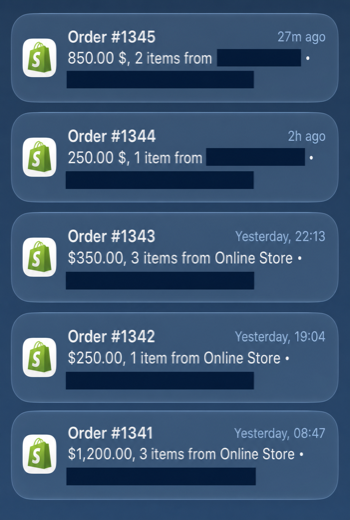
Orders #1341 through #1345 show $2,900 in displayed gross order value across 10 items. Continue to the next order record.
Questions before contact
Common questions.
Who should use Shopify paid search?
Use it when paid traffic reaches the store but order volume, ROAS, margin, product-page conversion, or purchase tracking does not hold up.

What do we get?
You get campaign structure, product landing page handoff, purchase tracking, budget control, plus the next action that should happen first.
How much does it cost?
From $3,000/month is the visible starting point or pricing band for this service. Variable work is priced after the asset, account, timeline, and owner involvement are clear.

How fast can this start?
Managed or sprint. Response comes through the intake path after the context is submitted.

Do we need a call first?
Not as the first move. Submit the situation first so the conversation starts with the real page, campaign, store, or decision instead of a blank sales call.
What if we already have a marketing team?
The work can complement an internal or external team by clarifying the account structure, store path, measurement, and next priority.
Do you take percentage of spend or flat fee?
Flat fee through $75K monthly spend. Above that, percentage of spend with a ceiling. The pricing stays visible and capped.

What about Meta and TikTok and Pinterest?
Meta is in the standard scope. TikTok and Pinterest scoped as add-on or in the Shopify Marketing Plan for omni-channel work. Each platform measures performance differently; the framework adapts.
How do you handle creative?
Creative production via partner or in-house operator. Stan Consulting owns creative direction and PDP-alignment; production sits with the right resource for the brand.
How do you reconcile attribution?
Shopify order data is compared with the ad-platform records, customer type, brand demand, refunds, and the measurement window before a channel result is accepted.
What is the minimum spend?
$3,000 monthly Shopify management with $15K-$50K monthly ad spend. Below that, submit the Shopify paid marketing context first; ongoing management usually does not pay yet.
External references
What the research says.
- PMax campaigns benefit from brand exclusion and asset-group segmentation by margin tier rather than single-group catalog-wide deployment. Google · Performance Max Best Practices
- Advantage+ performance depends on creative alignment to PDP and dedup of branded audiences. Meta · Advantage+ Shopping Campaigns
- Reconcile platform-attributed conversions with Shopify orders, then remove overlap before calculating customer-acquisition cost. Shopify · Tracking Data and Attribution
- Paid traffic programs that report against bank-account revenue outperform programs optimised against platform-attributed ROAS on measurable contribution to growth. CXL · Paid Advertising Strategy
This service answers these pains
If this describes the problem, these pages explain why.
Marketing service check
What Stan Consulting checks before Shopify traffic scales.
Short answer: Shopify paid search only works when the campaign, feed, product page, cart, checkout, tracking, and offer can turn traffic into purchases.
| Buyer signal | What it can mean | What Stan Consulting checks | Money risk |
|---|---|---|---|
| Sessions and clicks are present but purchases are weak | The paid traffic may be exposing PDP doubt, offer weakness, checkout friction, or tracking errors. | Campaign intent, product feed, PDP promise, cart friction, checkout path, tracking, and purchase quality. | More ad spend feeds a store leak instead of proving demand. |
| Add-to-cart or checkout starts do not become orders | The buyer may understand the product but not trust the offer, price, delivery, returns, or checkout path. | Trust signals, price presentation, offer stack, shipping, payment friction, mobile path, and abandoned-cart evidence. | The store keeps paying for intent that dies closest to purchase. |
| Do not change first | Do not raise budget, change platform, or rebuild the theme before the store leak is named. | The marketing review separates traffic problems from product-page, cart, checkout, and tracking causes. | Changing the wrong part makes the problem harder to find and easier to repeat. |
Start with the buyer problem this service should solve. Open the matching problem.
Use the industry map when Shopify economics depend on product margin, repeat purchase, and buyer urgency. See industries.
Use the result library before scaling paid traffic that needs proof instead of platform optimism. See results.
Shopify revenue proof shows the kind of marketing evidence a buyer should inspect before the next spend decision. Open the proof.
If the leak crosses more than one layer, move the decision through the Shopify paid marketing request before implementation. Share the Shopify PPC context.
Fit check
Shopify Marketing and paid search for Traffic That Is Not Turning Into Sales: a fit when the account, website, store, or intake path can actually be changed.
Bring the page, campaign, offer, tracking, and follow-up context. The growth plan shows which step is losing calls, quotes, orders, bookings, or sales.
The company has real demand, budget, or traffic, and can change the page, offer, proof, tracking, follow-up, or spend logic.
Shopify Marketing and paid search for Traffic That Is Not Turning Into Sales: numbers and meetings help only when the page, account, store, or intake problem is named.
The web address, the offer, the ad or search source, the sales action that should happen, and what currently happens instead.
Scale Shopify traffic only after the store signal is clear.
Use the intake path when paid clicks reach the store but profitable orders do not follow. If the leak is unclear, share the store and ad context first.
Request a quoteBuyer check
What to check before choosing this service
The service should be judged by the demand it captures, the page buyers reach, conversion tracking, lead or order quality, and the sales result after the click.
Good fit
Use it when the offer and sales capacity are clear enough to turn paid demand into qualified calls, quotes, consultations, or orders.
Check first
Before adding budget, check search or audience intent, campaign settings, landing-page match, conversion definitions, and follow-up.